

Build and Deploy Reliable Azure Infrastructure-as-Code
Moka AI turns your words into infrastructure—faster, smarter, and error-free.
DevOps can be complex. Moka makes it simple.
With Current Tools:
Writing ARM templates manually is time-consuming.
Syntax errors slow down deployments.
Onboarding new team members takes too long.
Requires "tribal knowledge" of JSON syntax.
Generic AI coding tools generate broken code.
With Moka:
Generate infrastructure code with plain English.
Validate and deploy with one click.
Built-in best practices and templates.
Anyone can get started instantly.
Generated code is guaranteed to be valid and working.
How It Works
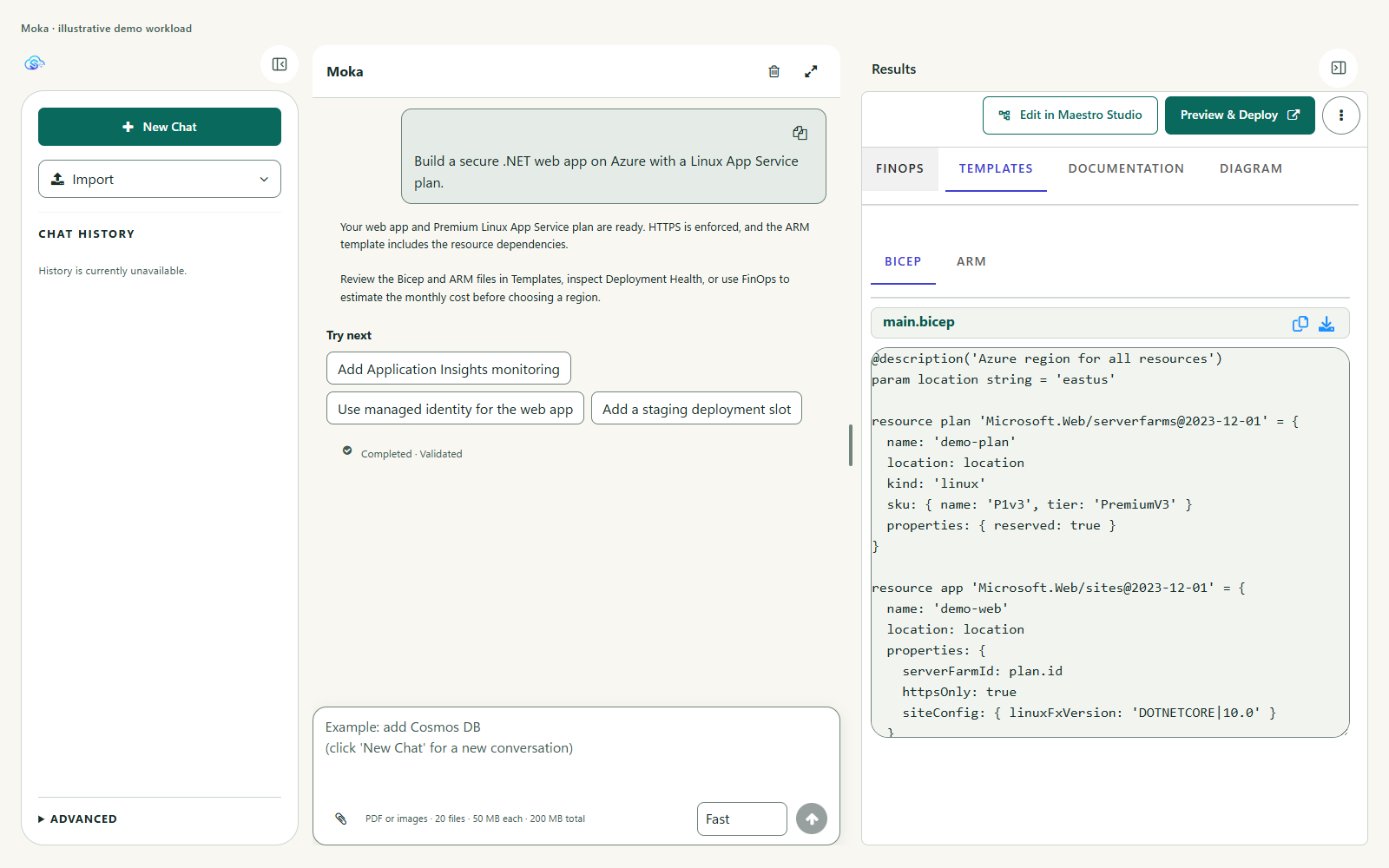
Step 1: Describe your infrastructure in natural language.
Step 2: Moka AI generates Azure-ready configurations + 1-click Preview & Deploy button.
Step 3: Moka generates documentation, deployment diagram, Azure CLI scripts for your pipeline, and a deployment health dashboard view.
Experience building and monitoring Azure deployments on a single pane of glass
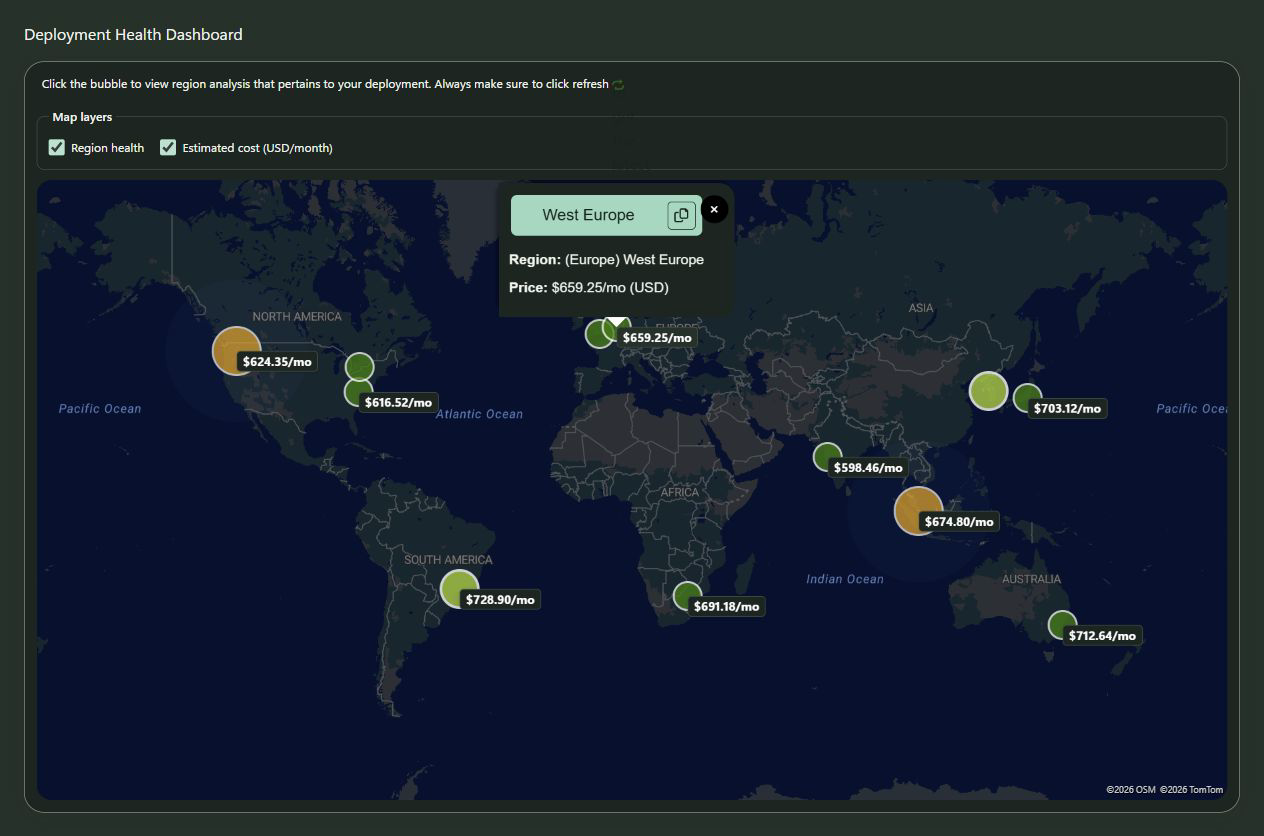
Moka's Deployment Health dashboard brings AI-generated deployment templates to life.
See how your deployment will perform in Azure in real-time—no more wasting time on trial and error.
Why Moka?
Every cloud or DevOps engineer knows the drill all too well. You've used an AI coding agent to help you build an Azure deployment template (ARM, Bicep, Terraform, or any IaC of choice).
It looks perfect syntactically. But chances are it will most likely not deploy without issues.
Perfect syntax doesn't guarantee a successful Azure deployment. Cloud deployments coding is different from traditional coding. Most AI coding assistants stop at code—leaving you to discover deployment failures, capacity limits and region constraints the hard way. Moka changes that. As your AI coding buddy, Moka vets every deployment template against real-time Azure conditions so you ship reliable cloud infrastructure on the first try.
With Moka, we're not hoping you will get value—we're guaranteeing you will get value and ROI.

Disrupting the status quo
Game-changing value
Moka is not another AI coding assistant that spews Azure deployment templates and leaves you hanging.
It's a new era for specialized AI coding assistants that is all about delivering value and realizing an ROI—not just getting output.
Work smarter. Get reliable results.
With Moka, reliability is not an afterthought, but front and center—a first-class benefit.
Cloud infrastructure volatility (including Azure's) can cause even the well-tested templates to fail unexpectedly.
Watch how Moka prevents this from happening. This video demonstrates a very common issue in Azure that even the Azure Portal cannot detect, but Moka can.
Functional, deployable templates
Moka raises the bar for AI coding assistants and establishes a new standard of excellence.
Moka's domain-adapted, fine-tuned AI models and custom algorithms generate valid, functional and deployment-ready assets.
Moka is the only† AI coding assistant that can guarantee both valid and functional Azure deployment templates.
Broken templates introduce security holes, especially with lingering resources from partial/failed deployments.
Predictable, AI analytics-based reliability
Even the most accurate templates can still fail when deployed in Azure, because:
Some Azure resources are not available in all regions.
Capacity constraints in some regions can deplete certain resources and make them unavailable at times.
Full deployment lifecycle management
Moka is the only specialized AI coding assistant that provides a full lifecycle management dashboard specifically tailored to your deployment templates—Moka unit-tests the templates, in every region, before presenting them to you.
View in real-time any potential issues impacting your deployment template's resources.
Deploy at the click of a button to verify the results.
Unlock your team's productivity on Azure and maximize your business value:
Get started† We regularly run tests against other AI coding assistants to confidently back this claim.
StratusOn Crescendo Analytics: Agentic AI in action
Moka's Deployment Health dashboard, shown above, is powered by the StratusOn Crescendo Analytics service—a mesh of AI agents (called actors) deployed across all Azure regions, collecting real-time reliability, capacity and health analytics data from each Azure region.
Learn more
Explore the Master Control view of your Azure deployment
Moka's user experience ensures conversational AI can be used to get a solution, or iterate towards one, and that the solution is maintainable, deployable and reliable.

Build it:
The Conversation View
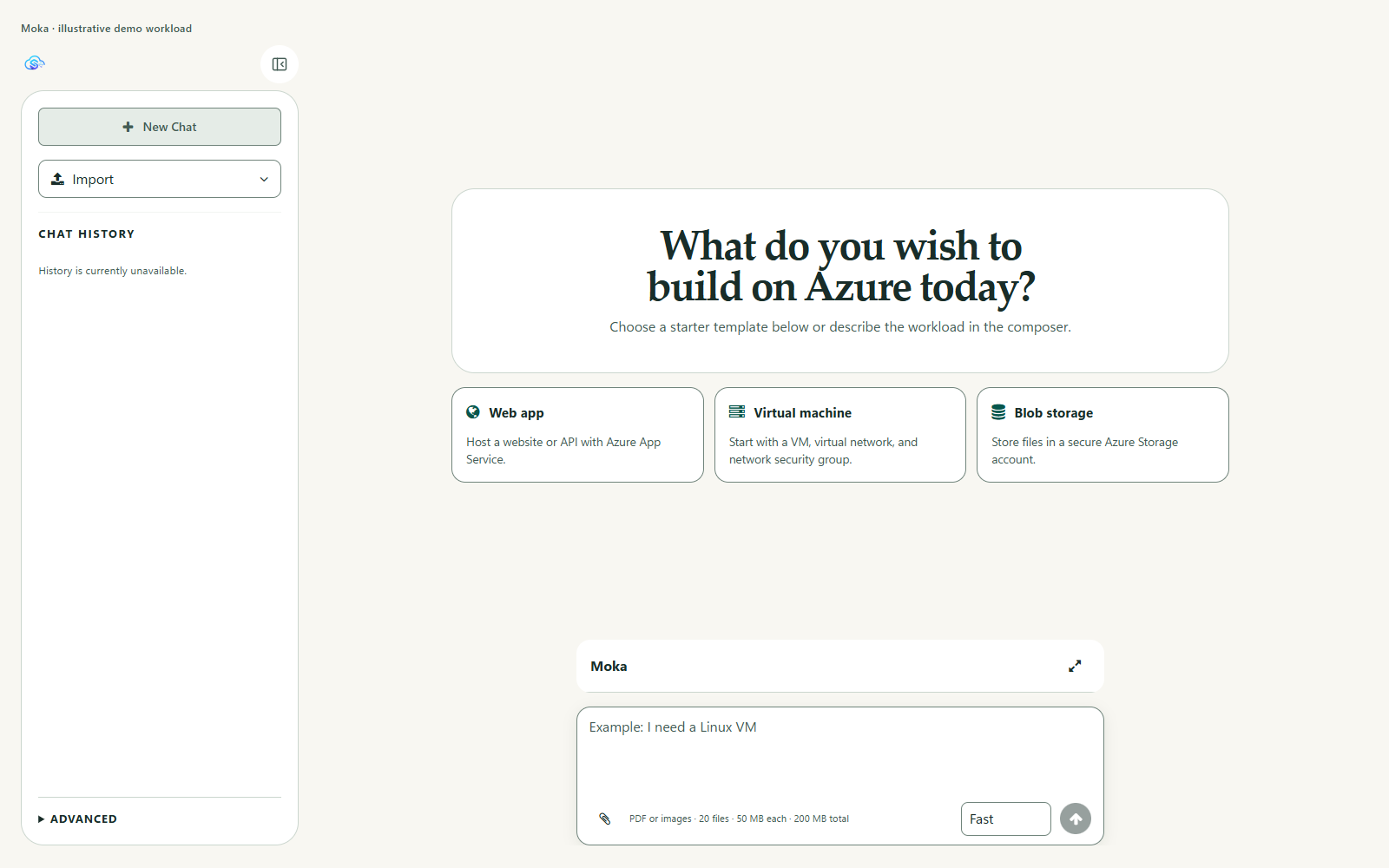
Start a conversation with Moka by typing in a question or—if not sure what to ask yet—start quickly with one of the Quickstart Questions—in any language!
Learn more

Manage it:
The Deployment View
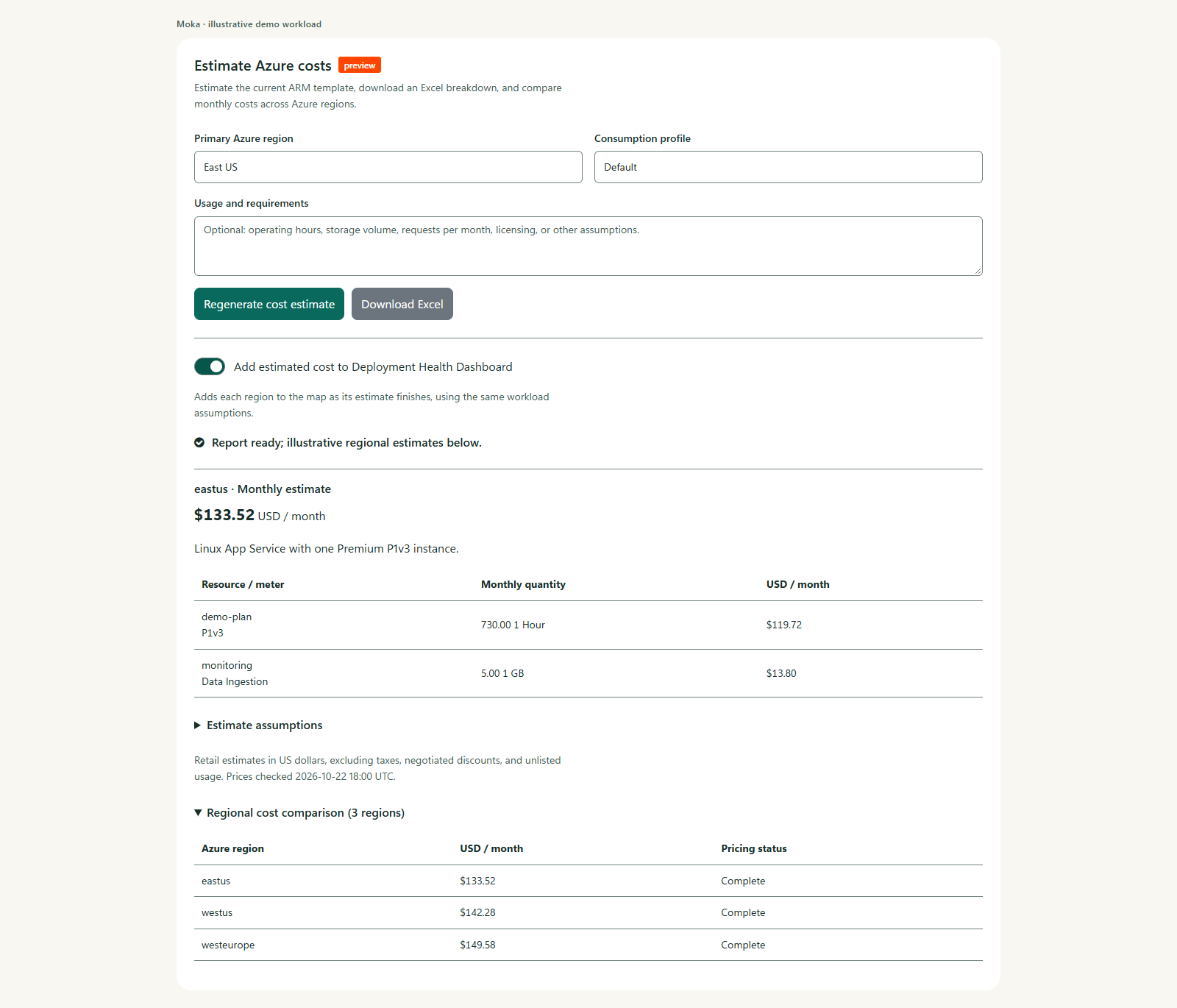
The Deployment View provides actionable insights and tools to allow a user to make an informed decision before they attempt to deploy an asset.
Learn more

Maintain it:
The Assets View
A complete solution goes beyond just providing the deployment assets (ARM & Bicep templates).
The documentation and deployment topology diagram that Moka generates form a knowledge base that allows a solution to be easily shared with other team members.
Learn more

Get started in 3 easy steps:
- Sign up for a free account
- Generate Azure deployment templates (ARM & Bicep) using Moka AI in seconds
- Share your work instantly with team members and others
NEW! Get from the Microsoft Marketplace

Plans
There are 3 different plans that cater to your different needs depending on where you are in your Azure infrastructure journey.
Starter
FREE
- 10 credits/month
- Bicep + ARM
- Deployment diagram visualization
- Solution documentation (several languages)
- Optimized for faster response time
- Intelligent next-question suggestions
- Built-in ARM best practices
- Multiple languages
- Instant preview
- 1-click sharing
- Download .zip package
Get from the Microsoft Marketplace
Basic
Best Value
$20
/ mo- All of the Starter plan plus:
- 100 credits/month
- Optimized for high deployment accuracy
- Conversations stored in the cloud
- NEW Deployment Health dashboard (learn more)
- Bring your own template (BYOT)
- Recommended naming rules
- Support included
- SLA included
Get from the Microsoft Marketplace
PRO
Contact Us
- All of the Basic plan plus:
- 500 credits/month
- Optimized for highest deployment accuracy and detail
- Generate Azure UI
- Build My Marketplace Offer
- Custom (bring your own) naming rules
- Advanced visual editing tools (ARM)
- REST API access
- Monitor Subscription Health & Reliability
Recent Blog Posts
Build, Test, and Deploy Reliable Azure Infrastructure with Moka AI
Cloud engineers spend too much time chasing failing deployments and tweaking templates. What if you could type a plain-English request and instantly get a fully tested, deployment-ready solution—complete with diagrams, docs, CLI commands, and one-click portal deployment? That's exactly what Moka AI delivers.

How Moka Beats the Azure Portal at Its Own Game
Every cloud engineer knows the drill. You log into the Azure Portal, spin up a basic Web App in East US, hit "Deploy" and watch the progress bar crawl. Thirty seconds (or so) later: deployment failed. Capacity issue. Now you repeat—West US, Central US, Australia East… rinse and repeat until you get lucky and find a region where the deployment succeeds.

Build and Monitor Azure Deployments in Any Language with Moka
Imagine you're a cloud engineer onboarding a team member who prefers working in Arabic or Hebrew. You need deployment templates, documentation and dashboards in right-to-left text—all aligned and error-free. Manual translation, stylesheet tweaks and endless testing can take days. What if you could describe your infrastructure in your own words—and your own language—and get fully functional Azure assets back in minutes?

Turn Your Existing ARM Templates into Rock-Solid Azure Deployments with Moka AI
If you've ever tried deploying an ARM template you found on GitHub, you know the drill: outdated API versions, hidden expression bugs, region-specific resource hiccups. You spend hours troubleshooting cryptic errors in the Azure Portal or tearing your hair out in Visual Studio Code—only to hit another snag at deployment time.

How Moka Works: The Agentic AI Backbone—StratusOn Crescendo Analytics
StratusOn Crescendo Analytics: Agentic AI in action—Moka's Deployment Health dashboard, shown below, is powered by the StratusOn Crescendo Analytics service—a mesh of AI agents (called actors) deployed across all Azure regions, collecting real-time reliability, capacity and health analytics data from each Azure region.

Frequently Asked Questions
Yes, you can engage in conversational AI with Moka, in natural language, over as many iterations as needed until you get the desired overall deployment template.
To make it easier to engage with Moka in follow-up questions (the process that constitutes some of what is referred to as vibe coding), Moka provides a list of 10 suggested follow-up questions based on the current state of the deployment template and on the history and context of the conversation. In most cases, users find one of the suggestions useful and select it, saving them from having to come up with the next question.
You can also import your existing ARM template using the Bring Your Own Template—or BYOT— feature and then perform the vibe coding process against it.
Yes, the 50 most recent conversations are automatically stored in your account's cloud storage, and you can load any previous conversation's results into Moka's canvas and start a new conversation off of it (for example, to start a new line of questions and incrementally build on top of your previous results).
All assets related to a conversation session are stored with it in your cloud account. This includes the deployment assets (ARM and Bicep templates), the documentation markdown, the deployment graph, the 10 suggested follow-up questions, and a snapshot of the state of the Deployment Health dashboard.
At this time, you can only import ARM templates.
The import process currently limits the size of the imported ARM template to 100 KiB. If a larger file needs to be imported, contact support@stratuson.com for assistance.
While the StratusOn Crescendo Analytics service supports all Azure regions, we are only supporting the 32 Azure regions designated by Microsoft Azure as recommended in the Basic subscription tier (the Depoyment Health dashboard is not supported in the free/starter subscription plan).
The 32 recommended regions are: East US, West US 2, West US 3, Central US, South Central US, Canada Central, Mexico Central, North Europe, West Europe, UK South, France Central, Germany West Central, Italy North, Sweden Central, Norway East, Poland Central, Spain Central, Switzerland North, Australia East, Central India, East Asia, Southeast Asia, Indonesia Central, Japan East, Japan West, Korea Central, New Zealand North, UAE North, Israel Central, Qatar Central, South Africa North and Brazil South.
The Pro subscription tier supports all Azure regions in the Deployment Health dashboard.
StratusOn Crescendo Analytics (SCA) is an AI service built and maintained by StratusOn.
SCA is an Agentic AI system with autonomous AI agents performing specialized operations backed by our domain-adapted, fine-tuned AI models (custom LLMs). You can read more about it and its architecture in the following blog post: How Moka Works: The Agentic AI Backbone—StratusOn Crescendo Analytics.
This screenshot shows what the health dashboard looks like when there are no potential issues related to the deployment template at the time the analysis report was generated. Clicking on any node on the map displays information about the node's health as it related to the current deployment. Moka's users can use the refresh button to refresh the data from SCA.
Anyone who has deployed on Azure using any Infrastructure-as-Code (IaC) framework will be able to relate to how frustrating it can be when they have a fully valid deployment template that has been tested many times only to fail on this one time, usually due to some capacity issue. Having zero-click access to StratusOn Crescendo Analytics from within Moka's UI enables getting an updated view of the deployment health posture—within seconds—before attempting to deploy, saving a user plenty of time and the hassle of having to clean up partial deployments after a failure.
This is the peace of mind many DevOps engineers have told us they wanted. Anyone who has productivity and deployment reliability in Azure as their top concern should care.